Hi nishan0804
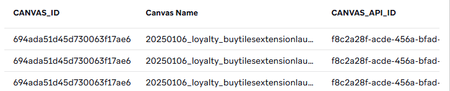
The short answer is: Canvas Name is not a queryable column in the Query Builder, even though it appears in your results.
Here's what I tried to make it work:
1. WHERE "Canvas Name" ILIKE '%te_%' — failed, invalid identifier
2. WHERE CANVAS_NAME ILIKE '%te_%' — failed, column doesn't exist
3. WHERE LOWER(CANVAS_NAME) LIKE '%te_%' — failed
4. Wrapping in a subquery and aliasing — failed
5. DESC TABLE USERS_CANVAS_ENTRY_SHARED — this was the reveal. The schema shows no Canvas Name column at all. It's a display label injected by Braze's UI layer, not a real Snowflake column, which is why it shows up in SELECT * results but can't be referenced in a WHERE clause.
The workaround is to filter by CANVAS_API_ID instead, which IS a proper schema column and works reliably.
This is where the Braze MCP comes in handy. If you have it connected, you can simply ask it to return all Canvas API IDs where the name starts with a certain string, and it will instantly query the Canvas List API and return exactly what you need — no manual dashboard digging. For example I asked it to find all canvases starting with 'te_' and it returned all the matching IDs in seconds, which I could plug straight into my query.
SELECT *

FROM USERS_CANVAS_ENTRY_SHARED

WHERE CANVAS_API_ID IN (

'8fb0ded9-d851-4cd8-be93-51340c0edb18',

'dfc376be-255b-4a12-90f2-7071ad69ebb9'

)

LIMIT 10
Not the most elegant solution but it's the only reliable way to filter by canvas in the Query Builder right now.
Would love to hear if anyone in the community has found a better way to handle this. And if not, it might be worth raising with Braze Support or as a product feedback request (fyi eakinsey ). Exposing Canvas Name as a queryable column would be a really useful addition, and if there is already a supported way to do it, some clearer documentation around it would go a long way.
Hope that helps!