Google Tag Manager

Forum Discussion

nishan0804's avatar
nishan0804
Supporter
20 days ago

Query Builder, Fetch records from USERS_CANVAS_ENTRY_SHARED view using Canvas Name

I am trying to build a query to find the conversation rate for a set of Canvas Name. When I execute below script 

select *  FROM USERS_CANVAS_ENTRY_SHARED 
--where "Canvas_Name" ilike     '%Promotional%'
 limit 10 ;

I am able to see the "Canvas Name"
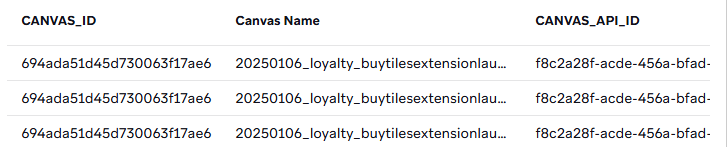
 but when I see the view properties, I do not find the column "Canvas Name"
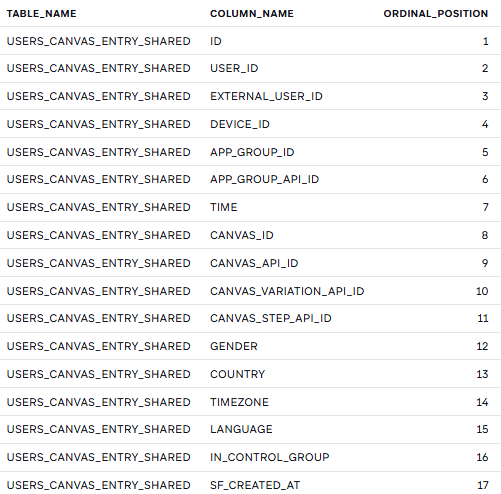
 

I am trying to fetch the Canvas_ID by providing Canvas Name. Please help. 

7 Replies

  • Hey nishan0804​ 

    The canvas_id value is what ends up surfacing the Canvas Name in the results you’re seeing. Echoing Nirnay​  that the Canvas Name itself isn’t actually part of the underlying table schema, it’s not something you can directly query against.

    I agree with Nirnay that this might be worth raising with Braze Support as product feedback. It would definitely make things easier if Canvas Name were available as a queryable field.

    In the meantime, the approach Nirnay suggested is probably the best path forward. As far as I’m aware, you’ll just need to reference the canvas_api_id values for the specific canvases you’re looking to analyze and use those in your query.

    Lastly, I did ask the BrazeAI operator about this, and the response I got back was essentially the same.

    Hope this helps!

  • Hi nishan0804​ 

    The short answer is: Canvas Name is not a queryable column in the Query Builder, even though it appears in your results.

    Here's what I tried to make it work:

    1. WHERE "Canvas Name" ILIKE '%te_%' — failed, invalid identifier

    2. WHERE CANVAS_NAME ILIKE '%te_%' — failed, column doesn't exist

    3. WHERE LOWER(CANVAS_NAME) LIKE '%te_%' — failed

    4. Wrapping in a subquery and aliasing — failed

    5. DESC TABLE USERS_CANVAS_ENTRY_SHARED — this was the reveal. The schema shows no Canvas Name column at all. It's a display label injected by Braze's UI layer, not a real Snowflake column, which is why it shows up in SELECT * results but can't be referenced in a WHERE clause.

    The workaround is to filter by CANVAS_API_ID instead, which IS a proper schema column and works reliably.

    This is where the Braze MCP comes in handy. If you have it connected, you can simply ask it to return all Canvas API IDs where the name starts with a certain string, and it will instantly query the Canvas List API and return exactly what you need — no manual dashboard digging. For example I asked it to find all canvases starting with 'te_' and it returned all the matching IDs in seconds, which I could plug straight into my query.

    SELECT *
    
    FROM USERS_CANVAS_ENTRY_SHARED
    
    WHERE CANVAS_API_ID IN (
    
    '8fb0ded9-d851-4cd8-be93-51340c0edb18',
    
    'dfc376be-255b-4a12-90f2-7071ad69ebb9'
    
    )
    
    LIMIT 10

    Not the most elegant solution but it's the only reliable way to filter by canvas in the Query Builder right now.

    Would love to hear if anyone in the community has found a better way to handle this. And if not, it might be worth raising with Braze Support or as a product feedback request (fyi eakinsey​ ). Exposing Canvas Name as a queryable column would be a really useful addition, and if there is already a supported way to do it, some clearer documentation around it would go a long way.

    Hope that helps!

    • AllanHeoFNM's avatar
      AllanHeoFNM
      Visionary

      Nirnay​ 

      Thank you for this detailed, thorough answer. We've always struggled with how CANVAS_NAME worked exactly, so this is super helpful. 

      And yes, it would be amazing to be able to query by the CANVAS_NAME. 

      Slightly confusing that it's not a real column but a Braze UI injection like you mentioned. 

  • Thank you for suggesting MCP. I have restriction to setup MCP. Could you help in finding from which table CANVAS_API_ID is pulling for the giving CANVAS NAME ?

    • AllanHeoFNM's avatar
      AllanHeoFNM
      Visionary

      Most Canvas-related tables should have a CANVAS_API_ID. If you're able to create a Braze API key, this may be easier to do using a custom script... 

      We're also working on improving our internal tool, BrazeSmith, where we can search for Canvases by keywords. Unfortunately, it'snot ready yet, but please keep an eye out! 

      For now, are you able to tag those Canvases and build the conversion set using the Report Builder?